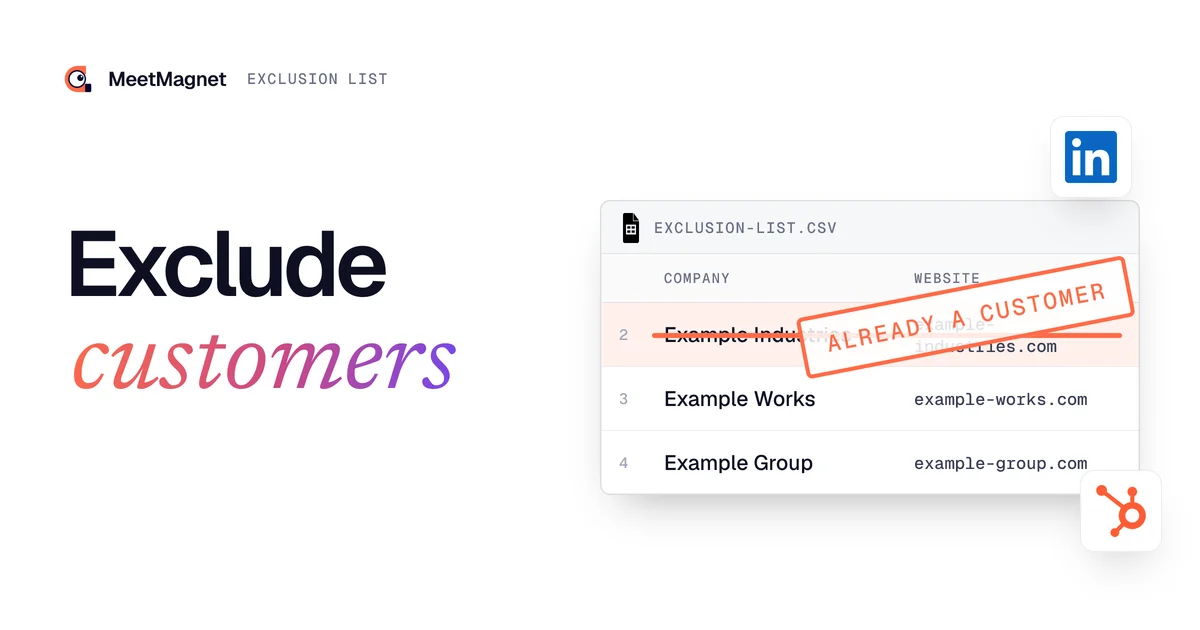
Exclusion list: how to exclude your customers (and your partners' customers) from prospecting
By Etienne DouillardUpdated 13 min read
Too long, didn’t read?
Ask your favourite AI to summarise this article and pull out the points that matter for your business.

Contents
- How do you exclude your customers from prospecting?
- Why exclude your customers and your partners’ customers from prospecting?
- Who should be on your exclusion list?
- Which identifiers make an exclusion list reliable?
- How do you exclude companies in Sales Navigator and in your CRM?
- Right to object: what does the CNIL say about suppression lists?
- What should you do if a customer was contacted by mistake?
- Which common mistakes leave gaps in an exclusion list?
- How does MeetMagnet avoid contacting your customers?
- Sources
You prospect, but you do not want a tool or an AI writing to your customers as if they were strangers. The answer fits in one file: an exclusion list, which removes from every search your customers, accounts in negotiation, your partners’ customers and the people who asked not to be contacted again. Here is who to put on it, which identifiers to use, how to apply it in your tools, and what to do when a customer gets contacted anyway.
📌 Key points
- An exclusion list is built on stable identifiers: the website domain and the LinkedIn company page URL, not the company name, which can be written ten different ways.
- It holds your customers, accounts in negotiation, your partners and distributors, your partners’ customers, and the people who exercised their right to object.
- It is updated every month and loaded into every tool: CRM, Sales Navigator, email tool, prospecting tool.
- The CNIL, France’s data protection authority, recommends keeping the information needed to respect someone’s objection for at least three years (CNIL, suppression list).
- A customer contacted by mistake can be won back: a short apology, follow-ups stopped, company added to the list, cause found.
How do you exclude your customers from prospecting?
You exclude your customers from prospecting by keeping an exclusion list that every tool checks before suggesting or contacting a prospect. The method has five steps, and the most important is the second: choosing identifiers that let nothing slip through.
- Gather the accounts to exclude: CRM export (customer status, open deals), billing list, email domains of your customer contacts, list of partners and their known customers.
- Identify each company by its website domain (
example-industries.com) and its LinkedIn page URL (linkedin.com/company/example-industries). The name alone is not enough. - Normalise: root domain without
wwwor path, one row per subsidiary with its own website, plus the group when all its subsidiaries are customers. - Load the list into every tool that finds or contacts prospects, and check on two or three known names that they are excluded.
- Update it every month, and immediately each time you sign a new customer or receive a refusal.
Key takeaway: an exclusion list loaded into only one tool out of three protects a third of your prospecting. ✅ The right habit is to keep it in one place, then copy it everywhere.

Why exclude your customers and your partners’ customers from prospecting?
Excluding your customers avoids disturbing a relationship that already pays, creating a conflict with a partner, and damaging your image. For people who refused your messages, it is also a legal obligation.
- 🤝 Do not bother a customer: getting a discovery message (“I’m reaching out because…”) from a supplier you have worked with for three years gives the impression that nobody follows the account.
- 🎁 Do not offer the welcome deal to an existing customer: a first-month discount, a free trial or a free audit sent to a customer who pays full price can trigger a request to match it.
- ⚖️ Do not create a conflict with a partner: a distributor, reseller or referral partner who sees their own customer approached by you wonders whether you are trying to go around them.
- Protect your image: a misplaced message can travel internally at a customer, and it suggests that your prospecting runs without anyone looking.
- 🛑 Respect the right to object: someone who asked not to be contacted again must not be, whatever the tool or the salesperson.
This came up in several of our meetings this autumn, almost word for word: “I prospect, but I don’t want the AI to contact my customers.” One customer summed it up in one sentence: contacting a customer by mistake “looks really bad”.
Key takeaway: the risk is not losing a prospect, it is embarrassing someone who already trusts you.
Who should be on your exclusion list?
A complete exclusion list covers six groups. The two most often forgotten: your partners’ customers and accounts in negotiation.
| Who to exclude | Why | Identifier to keep |
|---|---|---|
| Active customers | Do not treat them as strangers | Website domain, LinkedIn page URL |
| Accounts in negotiation | Another message muddles the ongoing discussion | Website domain, LinkedIn page URL |
| Partners, distributors, resellers | They are not prospects | Website domain, LinkedIn page URL |
| Your partners’ customers | Avoid channel conflict | Website domain, LinkedIn page URL |
| People who refused to be contacted | Right to object | LinkedIn profile URL, email address |
| Competitors | They read your messages for other reasons | Website domain, LinkedIn page URL |
👉 Ask your partners for the list of their customers you should not approach, or at least their most sensitive accounts. Five minutes of conversation avoids months of friction.
Former customers are a special case: depending on how the relationship ended, you either exclude them or contact them again with a message that acknowledges the history. Our article on reactivating old prospects gives the method for the ones you really want to win back.

Which identifiers make an exclusion list reliable?
A reliable exclusion list relies on the website domain and the LinkedIn company page URL, because they are two unique, stable identifiers. The name, on the other hand, changes depending on who writes it.
Example: the same company can show up as “Example Industries”, “EXAMPLE INDUSTRIES LTD”, “Example Group” or “Ex. Industries” depending on the CRM, the invoice or its employees’ LinkedIn profiles. Its domain stays example-industries.com, and its LinkedIn page stays the same.

Three normalisation rules close most of the gaps:
- 🔗 The root domain:
example-industries.com, nothttps://www.example-industries.com/contact. - 🏢 Subsidiaries: one row per subsidiary with its own website or LinkedIn page; the group as well only if the whole group is a customer.
- 👤 People: for a refusal, keep the LinkedIn profile URL rather than the name, and the email address if you have it.
Key takeaway: a company name is hard to match, a URL is easy to match. 💡 If your CRM does not store your customers’ websites yet, that is the first field to fill in.
Your exclusion list is the negative of your target: our guide to the ideal customer profile helps you write the other half.
Prospect without the risk of writing to your customers
How we choose who to contact, who to leave out, and what we write to get a first meeting.
How do you exclude companies in Sales Navigator and in your CRM?
In Sales Navigator as in a CRM, exclusion works through a list: you save the accounts to leave out, then tell each search or each send to skip them.
In Sales Navigator, you can create an account list by uploading a CSV file; LinkedIn requires an account name column, limits each file to 1,000 accounts and says that complete information improves match quality (LinkedIn, account lists from CSV files). Search filters then include “Account lists” and, if your CRM is connected, the people and companies in your CRM (LinkedIn, filter definitions). Each filter can be set to “Include” or “Exclude” (LinkedIn, searching in Sales Navigator): a “Customers” account list set to exclude keeps their employees out of your searches.
In a CRM, the simplest approach is a “customer” status or property on the company, and a “do not contact” box on the person. HubSpot, for example, lets you pick in the “Don’t send to” menu the segments or contacts that must not receive a marketing email (HubSpot, excluding recipients). A “Customers and partners” segment placed there protects every send.
In a prospecting tool, look for the import of an exclusion list (often a CSV), and ask which fields it matches on: the name alone, or the website and LinkedIn page too.
Right to object: what does the CNIL say about suppression lists?
The CNIL calls a suppression list (liste repoussoir) the list that durably keeps out of any new prospecting the people who objected to it. The right to object is absolute in prospecting: the person does not have to give a reason, and must be able to stop the messages at any time (CNIL, suppression list).
Three CNIL rules apply directly to your exclusion list:
- Only for objections: the data on the suppression list is used for nothing else, and only what is necessary is kept.
- Over time: the CNIL recommends keeping the information needed to respect the objection for at least three years.
- In every message: between businesses in France, email prospecting can be done without prior consent if the message relates to the person’s job, but they must be able to refuse easily (CNIL, email prospecting).
⚠️ A “no thanks” on LinkedIn counts as an objection: add the profile URL to the list the same day, or another campaign will contact them again in three months. Our article on GDPR and B2B prospecting covers the rules channel by channel.
What should you do if a customer was contacted by mistake?
If a customer was contacted by mistake, reply quickly, apologise in one sentence, stop the planned follow-ups and add their company to the list. Then find out why it was not on it: that is the only way to avoid a second time.

Here is a real case, anonymised. A customer of ours was prospecting on LinkedIn. She received an email from a salesperson at another company: a buyer she had approached worked at one of that company’s major customers. She asked us for three things: permanently stop follow-ups to that person, stop prospecting the employees of that company, and set up a list of companies not to contact.
The lesson: your exclusion list must contain your partners’ customers, not only your own. Nobody had made a targeting mistake: the buyer fitted the target perfectly. What was missing was a piece of information only our customer had.
Example
Apology to a customer contacted by mistake: “Hi Claire, you received an introduction message from me that was not meant for you: you are a customer, and our prospecting should have left you out. My apologies, it is fixed on our side. Nothing changes in how Paul looks after your account.”
Which common mistakes leave gaps in an exclusion list?
Gaps in an exclusion list almost always come from the same mistakes: a name instead of an identifier, a list never updated, or an exclusion so broad that it removes good prospects.
- Matching on names: “Example Industries” does not match “EXAMPLE INDUSTRIES LTD”.
- Updating once a year: customers signed since January get prospected in October.
- Forgetting accounts in negotiation: a second salesperson follows up an account already in discussion.
- Excluding a whole group because one subsidiary is a customer: the other subsidiaries are often your best prospects.
- Excluding a person forever because their former company was a customer: when a customer contact moves to a new company, they become a prospect who already knows you.
That last case pays off most when handled separately. A happy customer who takes a job elsewhere has every reason to reply to you, as our article on the job change as a buying signal explains. The reverse case exists too: an employee of an active customer shows a buying signal.
Example
Signal: the purchasing manager of a customer company posts on LinkedIn that she is looking for a second supplier for a site that is opening.
Prospecting message sent without an exclusion list: “Hi Sophie, we help companies like yours. For a first project, we offer the first month free. Would you be available this week?”
Message from the person who looks after the account, which gets a reply: “Hi Sophie, I saw you are opening a new site. We already work with your team on the current one: shall we look together at what it would take over there?”
The first message treats a customer as a stranger and offers her a discount she never had. The second starts from the same signal, but from the right side of the relationship. 🎯 Exclusion does not erase the signal: it sends it to the right person.
How does MeetMagnet avoid contacting your customers?
With us, the rule is simple: you give us the list, and our systems apply it to every search. As Etienne puts it: “Making a list with the customer’s website or LinkedIn URL is the best thing you can do: behind it, MeetMagnet’s systems exclude these ‘already customers’ from searches if they come up.”
In practice, three safeguards add up:
- 📄 An exclusion list in CSV: names, websites and LinkedIn URLs of your customers, partners and ongoing accounts. A list by website or company page lets you exclude the whole company.
- 🔒 Your network: people already connected with you on LinkedIn (1st degree) are not contacted automatically.
- 🗂️ Your CRM: when possible, read-only access to your CRM lets us check that a person is not already known, and avoid duplicates.
These settings are made at the start, along with the target and the signals tracked. In the Managed plan, at €299 excl. VAT per month, someone from our team sets them up with you; the Self-serve plan, at €149 excl. VAT per month, leaves this setup to you. To go further, our article on the AI SDR details what can be handed to AI and what stays human, and the one on qualifying a B2B prospect explains how to sort those who remain.
An exclusion list takes an hour to start and a few minutes a month to maintain. Put your customers, ongoing accounts, partners, their customers and every refusal on it, with their website and LinkedIn page: your prospecting can move fast without landing on someone who already knows you. 🚀
Sources
- “Comment utiliser une liste repoussoir pour respecter l’opposition à la prospection ?”, CNIL, accessed 5 November 2026, https://www.cnil.fr/fr/comment-utiliser-une-liste-repoussoir-pour-respecter-lopposition-la-prospection
- “La prospection commerciale par courrier électronique”, CNIL, accessed 5 November 2026, https://www.cnil.fr/fr/la-prospection-commerciale-par-courrier-electronique
- “Guidelines for creating account lists using CSV files”, LinkedIn Sales Navigator Help, accessed 5 November 2026, https://www.linkedin.com/help/sales-navigator/answer/a408255/guidelines-for-creating-account-lists-using-csv-files?lang=en
- “Sales Navigator lead and account search filter definitions”, LinkedIn Sales Navigator Help, accessed 5 November 2026, https://www.linkedin.com/help/sales-navigator/answer/a1452817
- “Search for leads and accounts in Sales Navigator”, LinkedIn Sales Navigator Help, accessed 5 November 2026, https://www.linkedin.com/help/sales-navigator/answer/a735730
- “Exclude specific segments or contacts from receiving a marketing email”, HubSpot Knowledge Base, accessed 5 November 2026, https://knowledge.hubspot.com/marketing-email/exclude-specific-lists-or-contacts-from-receiving-a-marketing-email
- MeetMagnet customer and prospect meetings (Noota meeting notes), September to October 2026.
Frequently asked questions
How do I stop AI from contacting my customers while I prospect?
Give it an exclusion list before you start: the website and LinkedIn company page URL of every customer, every account in negotiation and your partners' customers. The tool checks each prospect it finds against that list and drops anyone who works at a listed company. Update the list every month, and each time you sign a new customer.
What is the difference between an exclusion list and a suppression list?
A suppression list, as France's data protection authority (CNIL) describes it, holds the people who objected to prospecting: it only serves to respect that right, and the CNIL recommends keeping that information for at least three years. An exclusion list is broader: it also keeps out your customers, your partners and their customers, for commercial reasons.
Is it legal to prospect your own customers?
Yes. The CNIL allows an exception for customers offered products or services similar to those they already bought, and between businesses the message must relate to the person's job. So the question is commercial rather than legal: a customer should not receive a discovery message, let alone a welcome offer.
Should I exclude a whole company or only the people I already deal with?
For an active customer, exclude the whole company: a prospecting message to another department suggests you do not know who your customers are. For a large group where only one subsidiary is a customer, exclude that subsidiary by its website and LinkedIn page, and keep the others in your target, with a message that mentions the existing relationship.
What should I do if a customer was contacted by mistake?
Reply quickly and simply: apologise without a long justification, stop the follow-ups planned for that person, add their company to the exclusion list, then find out why it was not on it. Warn the person who looks after that customer on your side, so they do not hear about it from the customer first.
Etienne Douillard
Co-founder and CEO, MeetMagnet
An engineer and entrepreneur for over five years, Etienne works every week with B2B SMEs on signal-based prospecting.
From intent to booking
MeetMagnet spots who has a reason to talk to you right now, writes the opener that stands out, and a real person keeps it on track.