LinkedIn profile views: a real buying signal?
By Etienne DouillardPublished 6 min read
AI summary
Too long, didn’t read?
Ask your favourite AI to summarise this article and pull out the points that matter for your business.

Contents
- Who can see their LinkedIn profile views?
- Is a profile view a buying signal?
- Should you message someone who viewed your profile?
- How do you tell a useful view from simple curiosity?
- Which signals are more reliable than profile views?
- How do you make your profile useful to visitors?
- Should you browse in private mode when prospecting?
- How do you spot real signals without spending hours on it?
- Sources
Someone viewed your LinkedIn profile. The first reflex is often to assume this person is interested in you, and to message them right away. For a small business owner or a B2B salesperson, a profile view looks like the perfect buying signal. In reality, it’s a weak signal, often incomplete, and it needs to be confirmed before it can serve as a reason to write.
Who can see their LinkedIn profile views?
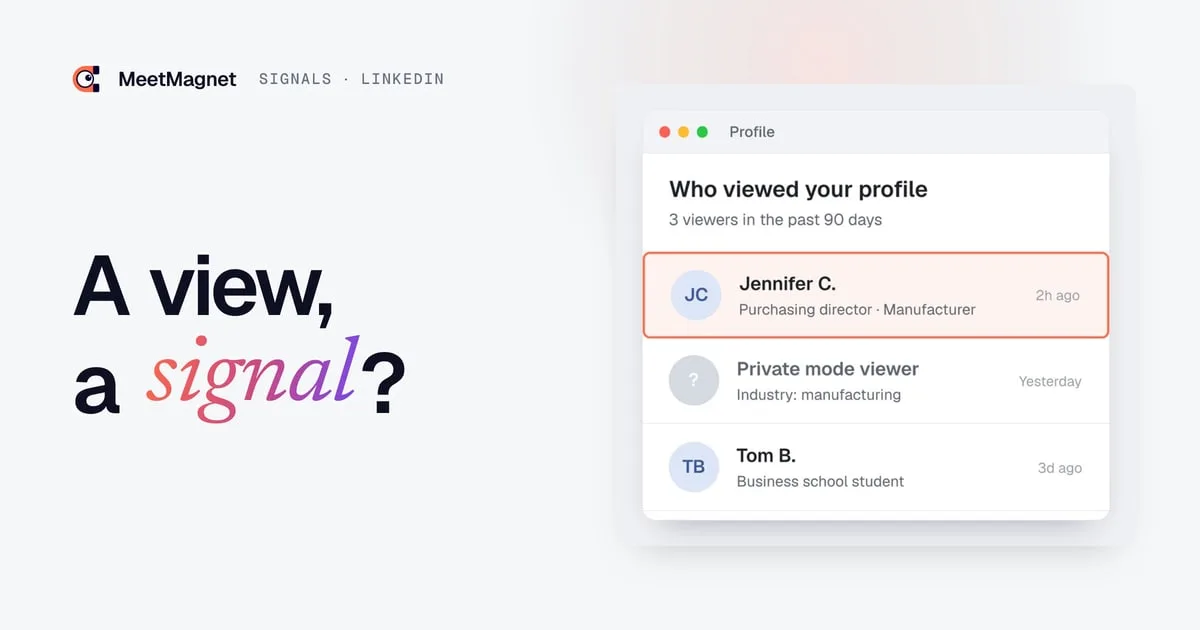
LinkedIn shows profile views in a limited way, and differently depending on your account type. According to LinkedIn Help, a free account only sees the three most recent viewers over the past 90 days. A Premium account sees the full list of viewers, over a period of up to 365 days.
There is another limit. People who browse in private mode don’t show up by name, even for a Premium account: they appear as anonymous viewers, with at best their industry or job function. So part of your profile views stays invisible, whatever your subscription.

Is a profile view a buying signal?
A profile view is a signal of interest, but a weak one. It shows that someone looked at your profile, not why. There are many possible reasons, and most of them have nothing to do with a need:
- 👀 Curiosity: your name came up in a comment or a suggestion.
- 💼 Recruiting: a recruiter or a candidate is browsing profiles in an industry.
- 🔎 Competitive research: a competitor is watching who works where.
- 📅 Meeting prep: someone is doing research before a scheduled call.
- 🎯 Genuine interest in your offer: the person is evaluating a solution to their problem.
Only the last case is a real buying signal. The problem is that the view alone doesn’t let you tell it apart from the other four. Our article on how to qualify a buying signal shows how to sort this kind of signal.
Should you message someone who viewed your profile?
Messaging someone because they viewed your profile is rarely a good idea if that’s the only reason. The message “I saw you viewed my profile” makes the person uncomfortable: they feel watched, and they often have no buying intent at all. If you have nothing to say beyond the view, wait: a real reason to write often shows up later, and that is the one to use.
The view becomes useful when it adds to another signal. A sales director who just started in the role, reacted to a post on your topic and then viewed your profile shows much clearer interest. In that case, you don’t write about the view, but about the main fact: the new role or the topic of the post.
Example
Signal: the purchasing director of a small manufacturer commented on a post about supply lead times, then viewed your profile.
Message that makes people uncomfortable: “Hi, I saw you viewed my profile. Can I tell you about our solution?”
Message that opens a conversation: “Hi Jennifer, your comment on supply lead times raises a real question for a lot of manufacturers this year. On your side, is the bottleneck more on spare parts or on raw materials?”
How do you tell a useful view from simple curiosity?
You recognize a useful view by what surrounds it. Three questions help you sort:
| Question | View of little use | View worth following |
|---|---|---|
| Is the person in your target? | Student, competitor, recruiter | Decision-maker at a company in your target |
| Do they have another recent signal? | None | New role, post, hiring |
| Does the view repeat? | Once, with nothing after | Several views or a reaction to your content |
A single view from someone outside your target deserves no action. A view from a decision-maker in your target, combined with another signal, is worth a closer look at what is happening in their company. Keep a short list of these cases, so that a second view or a new post from the same person catches your eye.
Which signals are more reliable than profile views?
The most reliable signals are the ones people make public themselves, because they reveal what they are going through:
- A recent new role: newcomers rethink their priorities and their vendors.
- A post about a problem: the person says in their own words what is on their mind.
- Repeated comments or reactions on the same topic: the interest is lasting, not passing.
- A hire related to your field: the company is preparing a project.
- A company announcement: a new site, a new market, a funding round.
These signals have one decisive advantage over a profile view: they give you something to talk about. You can write about a hire or a post, not about a profile view. Our B2B buying signal examples go through these situations and the opening line that fits each one, and our guide explains how to identify business signals in your target market.

How do you make your profile useful to visitors?
If prospects visit your profile, they had better find a clear answer to the question “what does this person do, and for whom?” A well-kept profile turns a curious visit into the start of a conversation, sometimes without you having to write anything.
- A headline that says what you bring, not just your job title: “I help small manufacturers cut their supply lead times.”
- A short “About” section that describes the problem you solve and for whom.
- Posts on your topic, even occasional ones, so visitors can see how you think.
- A simple way to reach you, visible without searching.
A visitor who understands in a few seconds what you do is more likely to accept a connection request or reply to a message later. Read your profile as a stranger would: if the first lines don’t say who you help, fix that before anything else.
Should you browse in private mode when prospecting?
Browsing in private mode keeps you from leaving a trace on the profiles you view. But with a free account, it also keeps you from seeing who views your own profile, according to LinkedIn Help. And openly viewing a prospect’s profile before writing to them is nothing to be embarrassed about: it’s often seen as a sign that you did your homework, especially if your profile clearly says what you do.
The most important thing is not to build your prospecting on profile views. They complement a signal; they don’t replace it. We explain targeting based on real interests in our article on intent-based targeting on LinkedIn.
How do you spot real signals without spending hours on it?
Spotting your target’s posts, reactions and new roles takes time if you do it by hand. MeetMagnet tracks buying intents on LinkedIn that you define together, such as “interested in supply lead times” or “just started a sales leadership role,” spots the decision-makers who show them in their posts and reactions, and suggests an opening line built on that signal, which you review before sending.

Sources
- “Who’s viewed your profile differences between basic accounts and Premium accounts”, LinkedIn Help, accessed October 2, 2026, https://www.linkedin.com/help/linkedin/answer/a548046
- “Private mode viewers of profiles”, LinkedIn Help, accessed October 2, 2026, https://www.linkedin.com/help/linkedin/answer/a564182
Frequently asked questions
Can you see who viewed your LinkedIn profile for free?
Partly. According to LinkedIn Help, a free account sees the three most recent viewers over the past 90 days, as long as you don't browse in private mode yourself. A Premium account sees the full list, up to 365 days. Private mode viewers stay anonymous for everyone.
Should you contact someone who viewed your LinkedIn profile?
Not for that reason alone. A view can come from a recruiter, a competitor or simple curiosity. If the person is in your target and shows another signal, such as a new role or a post, write to them about that main fact, never about the view.
Are private mode views visible?
Not by name. According to LinkedIn Help, even a Premium account cannot see the names of people who view a profile in private mode. They appear as anonymous viewers, with at best an indication of their industry or job function.
Which LinkedIn signals are more reliable than a profile view?
The signals people make public themselves: a recent new role, a post about a problem, repeated reactions on the same topic, a hire or a company announcement. They show what the person is going through and give you a real topic of conversation.
Etienne Douillard
Co-founder and CEO, MeetMagnet
An engineer and entrepreneur for over five years, Etienne works every week with B2B SMEs on signal-based prospecting.
From intent to booking
MeetMagnet spots who has a reason to talk to you right now, writes the opener that stands out, and a real person keeps it on track.