Automated prospecting: how to build a no-code AI prospecting machine
By Etienne DouillardUpdated 9 min read
Contents
You spend hours hunting for prospects, personalising your messages and trying to catch your targets’ attention on LinkedIn?
What if you could automate part of that process using no-code tools and artificial intelligence (AI)?
In this tutorial, we’ll walk you step by step through building your own automated prospecting machine, without writing a line of code.
Why automate your prospecting with AI?
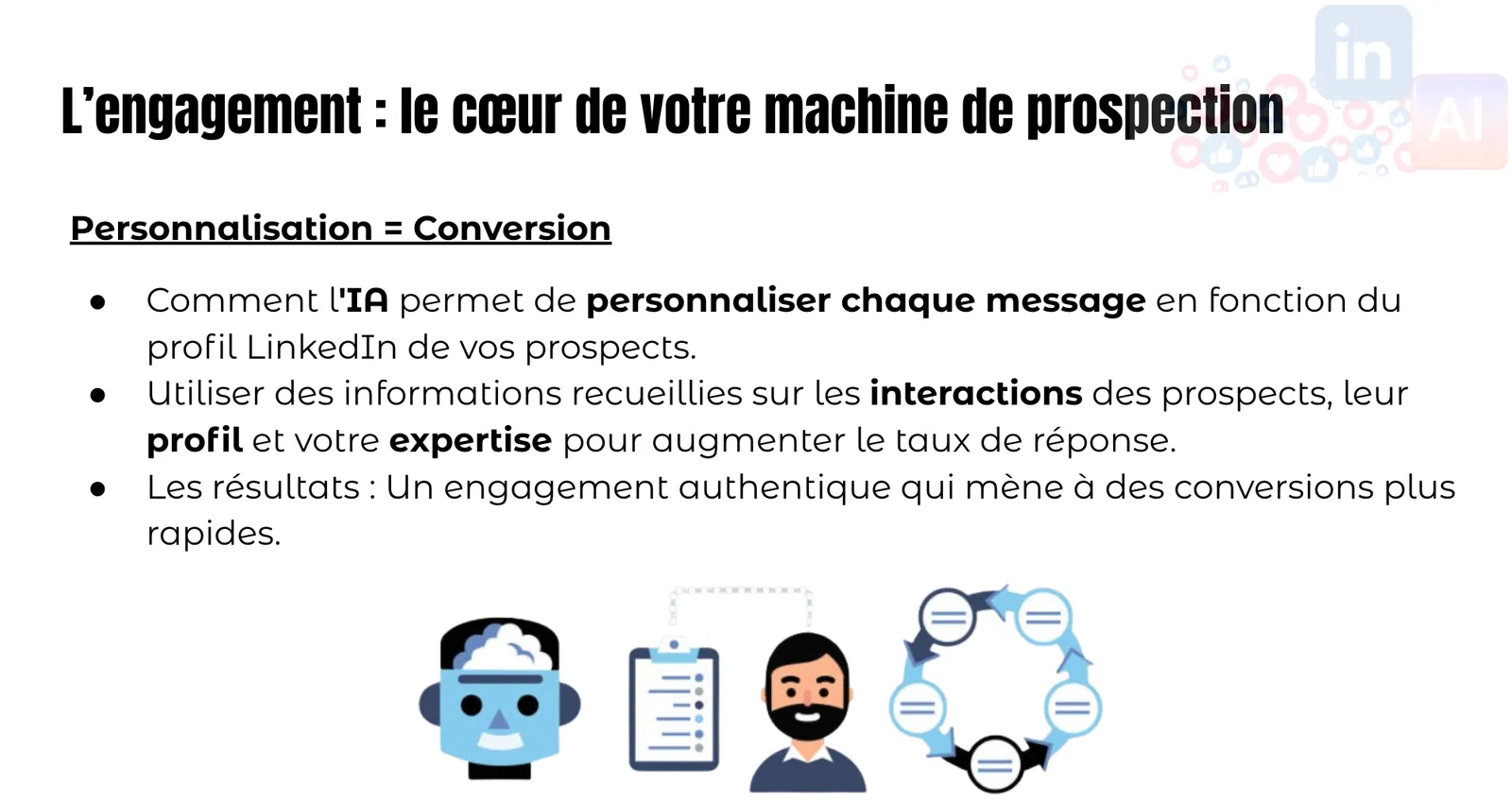
AI and no-code tools have transformed how we can approach prospecting. They let you:
- Save time by automating repetitive tasks.
- Personalise messages at scale thanks to AI.
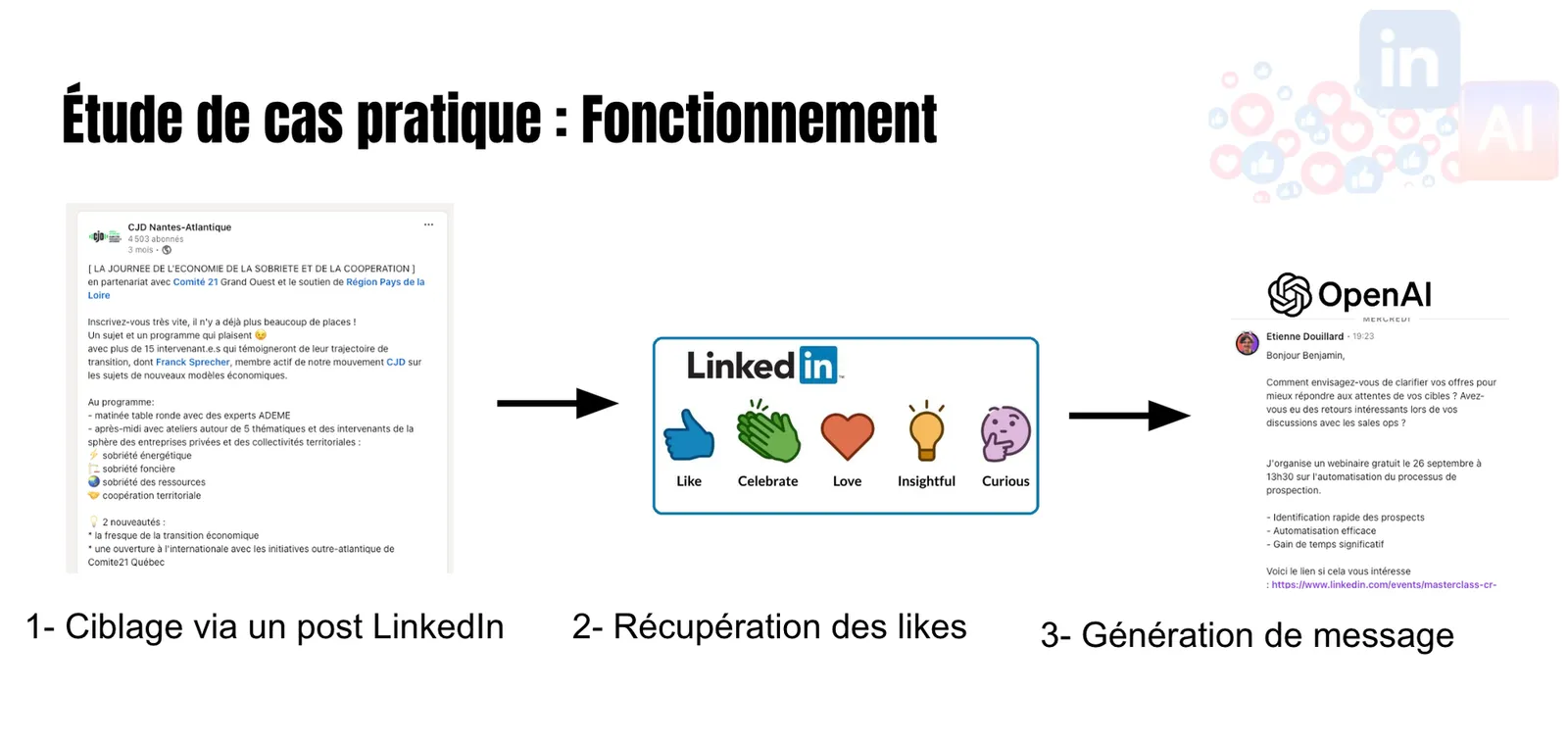
- Target precisely based on prospects’ interactions and interests on social media.
- Improve reply rates by sending relevant, individualised messages at the right moment.
This video is the technical follow-up to our LinkedIn webinar: 🔴 Masterclass: Build your LinkedIn prospecting machine with AI:
Tutorial video
Here’s the use case we’re building today:
Get the automation already built, by email 🤌
Import the workflow directly as a JSON file into your Make workspace 👇🏼😎
Make workflow: write prospecting messages for people who like LinkedIn posts
Overview of the tools used
To build our prospecting machine, we’ll use the following tools:
The scraper you’ll need is this one: https://apify.com/meetmagnet-owner/linkedin-post-like-scraper
We built it for you, creating the cheapest actor of its kind on the platform 🎁
- Make: To orchestrate the automation without code.
- OpenAI GPT: To filter prospects and generate personalised messages using AI.
Steps to build your prospecting machine
1. Trigger the automation: Tally
Timestamp in the video: 0:40
Start by building a Tally form that serves as the starting point for your automation. This form can be used to collect specific information or to trigger the process when an action is taken.
- Building the form: Include the fields you need, such as the URL of the target LinkedIn post and your session cookies to scrape LinkedIn.
- Connecting to Make: Link Tally to Make so that every new form submission triggers your automation.
Collect your LinkedIn cookies
Cookies are essential for scraping data online because they let you authenticate requests, avoiding brute-force blocks. Using them ensures secure and effective data collection online.
Install the Cookie-Editor extension
We recommend installing the Chrome extension Cookie-Editor.
Collect the cookies
Once installed, you can grab your cookies by clicking the cookie icon (1), then exporting the cookies (2).
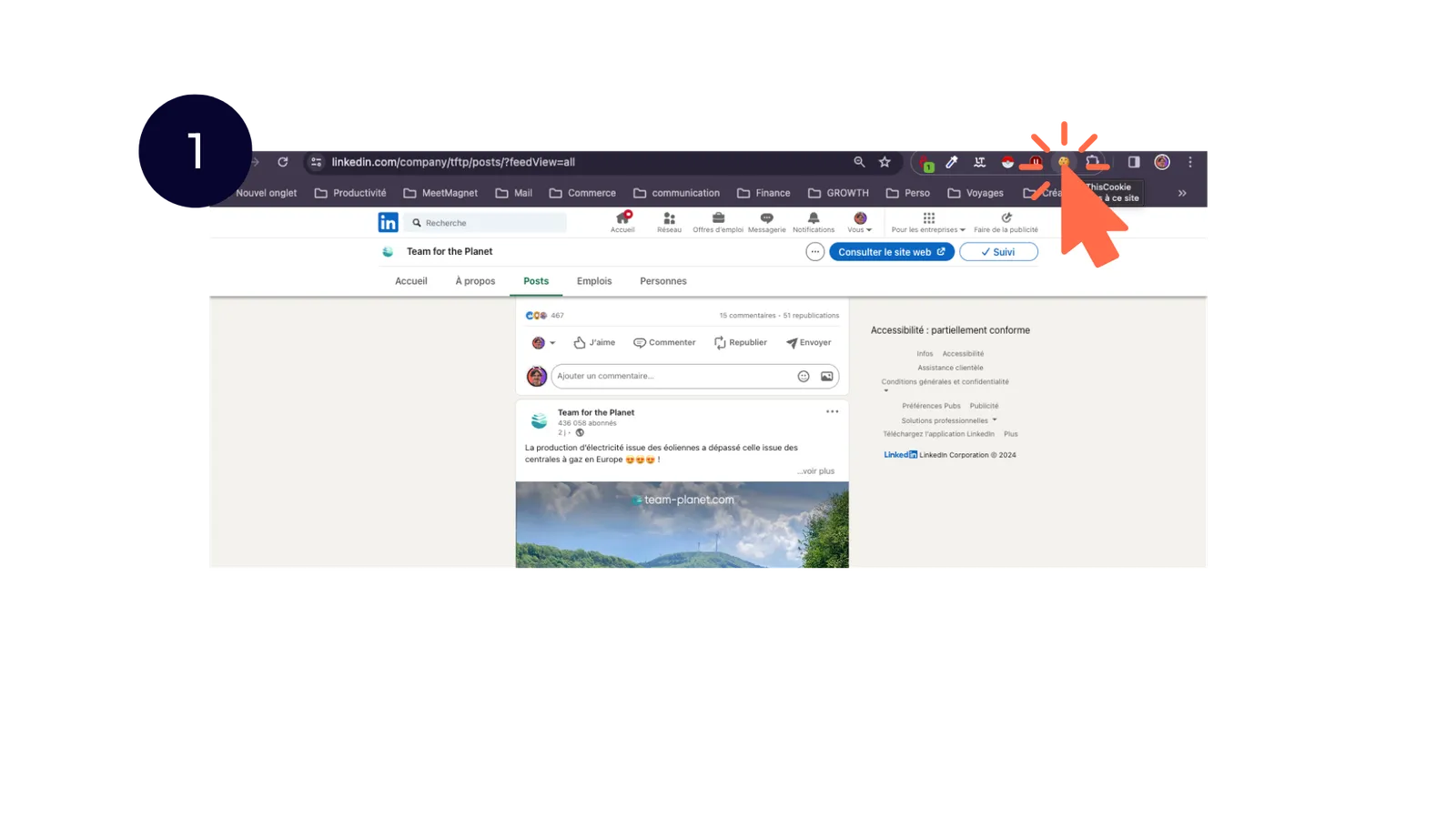
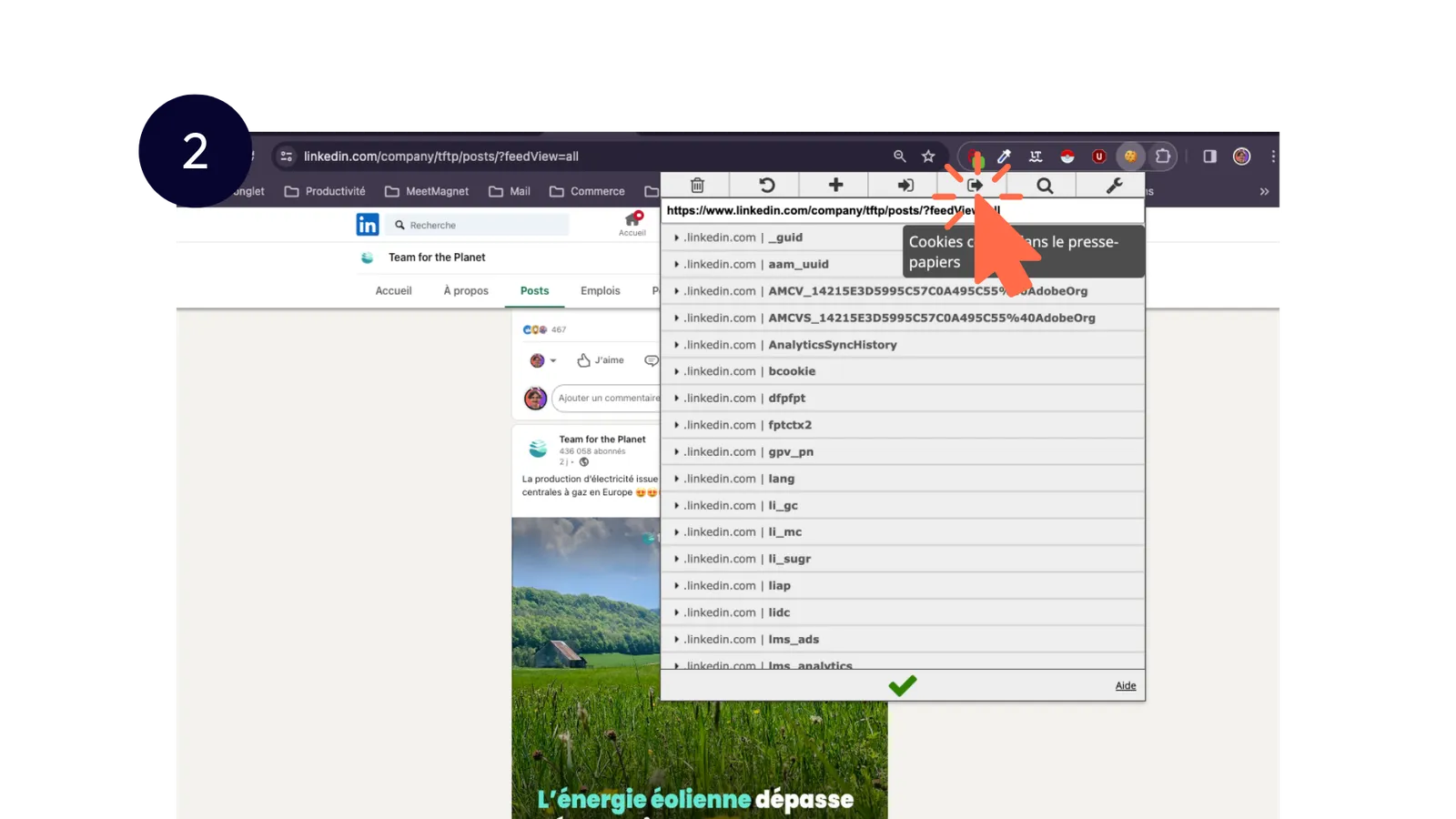
⚠️ Make sure you pick the right icon!!

Then paste your cookies into Tally and submit 🏁
2. Set up your filtering variables: persona & job titles
Timestamp in the video: 2:32
Define the criteria for your target audience:
- Persona: Who are your ideal prospects? What do they care about?
- Job titles: What roles or functions do they hold?
These variables will be used to filter the data later in the process.
3. Scrape LinkedIn with Apify
Timestamp in the video: 5:40
Use Apify to extract the LinkedIn profiles who liked the LinkedIn post.
- Setting up the actor: Configure Apify to scrape the likes, comments or posts of your target prospects.
- Collecting the data: Pull information such as name, job title, company and profile link.
4. Process the data with Make
Timestamp in the video: 8:27
Connect Apify to Make to automate the data flow.
- Building the scenario: In Make, create a scenario that takes the data from Apify and prepares it for filtering.
- Cleaning the data: Make sure the data is well structured for the next step.
5. Filter with GPT
Timestamp in the video: 12:00
Use GPT to filter prospects against the criteria you defined earlier.
- Setting up the prompt: Write a prompt that asks GPT to decide whether a prospect matches your persona and target job titles.
- Applying the filter: Run each prospect through GPT to keep only the relevant profiles.
Example prompt:
Act as a filter on job title type.

Your role is to categorise whether a job title matches one of the desired job categories or not.

Here are the desired job categories:

{{19.`job_category1`}}
{{19.job_category2}}
{{19.`job_category3`}}
{{19.`job_category4`}}
{{19.`job_category5`}}


For example:
For the job category "sales manager" and the job title "salesperson", the answer is yes.

For the job category "HR manager" and the job title "director of human resources", the answer is yes.

For the job category "CSR manager" and the job title "wellbeing at work manager", the answer is yes.

For the job category "sales manager" and the job title "head of acquisition", the answer is yes.

For the job category "sales manager" and the job title "growth hacker", the answer is no.

For the job category "CSR manager" and the job title "I help companies thrive", the answer is no.


Answer yes or no depending on whether the following job title "{{34.choices[].message.content}}" matches one of the following job categories:
-{{19.`job_category1`}}
-{{19.job_category2}}
-{{19.`job_category3`}}
-{{19.`job_category4`}}
-{{19.`job_category5`}}

Reply with a single YES or NO only, if the job title matches at least one of the job categories.

Do not add any other sentence or word to the answer besides yes or no
6. Generate personalised prospecting messages with GPT
Timestamp in the video: 17:00
For each filtered prospect, generate a personalised message.
- Building the message prompt: Include variables such as the prospect’s name, their job title, and the interaction they had (for example, a like on a specific post).
- Generating the message: Use GPT to write a message that reads as if it were handwritten and that references specific details about the prospect.
Example prompt:
Act as a copywriting specialist for prospecting messages.

As the seller, you need to write a very short prospecting message (500 characters max) for a prospect designed to get a reply.

The tone of the message is formal (you/your)

The message is an email.

To help you, you'll receive several pieces of information:


1- Information about the prospect and their pain point.
2- Information about the seller and the solution being sold.
3- Information about the prospecting context.
4- An example message to follow


The goal is to catch the prospect's attention to start a conversation related to the context, without selling a solution directly.

Use keywords related to the prospect to capture their attention and end ideally with a question that invites discussion.

----------------------------
1- Information about the prospect and their pain point

Prospect's last name: {{48.lastName}}
Prospect's first name: {{48.firstName}}
Prospect's company or organisation name: {{32.`Company Name`}}.
Industry: {{32.Industry}}
Headline: {{48.headline}}

The prospect's pain point is the following:
{{1.`persona pain point`}}
---------------------------------------------------

2- Information about the seller and the solution being sold.

Seller's first name: {{1.`Seller first name`}}
Seller's last name: {{1.`Seller last name`}}
They are {{1.`Seller job title`}} at {{1.`Seller company name`}}
They sell the following solution: {{1.`company's core activity`}}

The full set of benefits brought by this solution are:

{{1.`persona benefit`}}

---------------------------------------------------

3- Information about the prospecting context.


The prospect {{48.firstName}} {{48.lastName}} is being contacted by Etienne Douillard because {{48.firstName}} {{48.lastName}} liked a LinkedIn post. Here is the full text of the post that the prospect {{48.firstName}} {{48.lastName}} liked:

" {{48.postText}}"

The prospect liked the content of the post, so the reply should be about the topic of the LinkedIn post. This is important.
---------------------------------------------------

4- Example message to follow:

{{1.`example message`}}
---------------------------------------------------
INSTRUCTIONS:


Here are instructions for writing a good prospecting message:


Don't:
🚫 Don't introduce the seller straight away; introduce them at the end of the message instead.
🚫 Don't mention the offer or the solution from the start of the message.
🚫 Don't use generic sentences.
🚫 Don't jump straight to the solution without setting the context.
🚫 Don't assume the prospect is already aware of the problem.
🚫 Don't be too vague about the challenges and the context.
🚫 Don't present the product as the ultimate solution.
🚫 Don't make unrealistic promises.
🚫 Don't skip the awareness and consideration stages.
🚫 Don't write in a long-winded way.
🚫 Don't write in a flowery way.
🚫 Don't write in a syrupy way.


Best practices:
✅ The message should read as if written by a human.
✅ Add emojis to make it more engaging 🤗.
✅ Don't sign the message.
✅ Don't write a subject line in the message.
✅ Write only with information you're sure of.
✅ Don't use generic variables in curly braces or brackets.
✅ Ask questions that lead the prospect to think about and voice their difficulties.
✅ Show a deep understanding of the obstacles the prospect faces.
✅ Highlight something relevant in the LinkedIn post.
✅ Share insights or advice that bring immediate value.
✅ Focus on the prospect, not on the seller.
✅ Be simple and direct.


Blacklist: Avoid using phrases like:
“you liked...”,
“you're passionate about...”,
“I loved the post by...”,
“I was blown away by...”
"your take was amazing..."
"your post is inspiring..."


If a resource or a URL is specified in the example to follow, then the answer MUST include the URL from the example message.


____________________________

Now that you have all the information, write the prospecting message, and add no other word or sentence besides the message requested.
7. Automated sending of the messages
Connect your system to LinkedIn through third-party solutions to send the generated messages.
And if you would rather get the same result without building the machine yourself, that is what the MeetMagnet app does: it spots signals on LinkedIn every day and writes the opener drawn from each one, which you review before it is sent.
- Automating the sending: Set up a new Make scenario to send messages via external tools.
- Tracking replies: Prepare a system to manage replies and keep the conversation going in a human way.
8. Future optimisations
Your prospecting machine is now up and running. To go further:
- Performance analysis: Measure open, reply and engagement rates.
- A/B testing: Test different messages or prompts to improve results.
- Continuous improvement: Update your criteria and messages based on the feedback you get.
Conclusion
By combining no-code tools and AI, you can build a powerful prospecting machine that saves you time while making your campaigns more effective. But why stop there?
Building your machine teaches you a lot. Running it every day is another matter: watching posts, filtering profiles, reviewing messages, following up.
That is where MeetMagnet takes over:
- Unlimited buying signals on LinkedIn: reactions and posts linked to your offer, spotted every day, with no lead credits and no AI credits.
- An opener drawn from the signal: every first message starts from what the prospect has just liked or written, and you review it before it goes out, on LinkedIn or by email.
- A real person with you, if you want one: on the Assisted plan, someone calibrates the target and the messages with you at onboarding, reviews the results on day 7, 30, 60 and 90, then in one meeting a month.
Two plans: Self-serve at €149 excl. VAT a month, with a 7-day free trial, or Assisted at €299 excl. VAT a month. The details are on the pricing page.
Enjoy building this kind of system? Our own AI setup for sales prospecting is available for free. And if you want ChatGPT or Claude connected to your CRM and sales tools, installed on your side, that is what our AI integration for sales teams is for.
Enjoyed this article? Feel free to share it.
Frequently asked questions
What tools do you need to build a no-code prospecting machine?
The tutorial uses Tally to build the form that triggers the automation, Apify to pull the LinkedIn profiles who liked a post, Make to orchestrate the automation without code, and OpenAI GPT to filter prospects and generate personalised messages.
How does GPT filter the prospects?
It gets a prompt listing the job categories you want, with matching examples (“sales manager” and “head of acquisition”: yes; “growth hacker”: no). GPT replies simply YES or NO for each prospect, and only the relevant profiles are kept.
What should the prospecting message prompt contain?
Information about the prospect and their pain point, about the seller and their solution, about the context (the text of the LinkedIn post they liked) and an example message. You also add instructions: don't introduce yourself upfront, don't mention the offer early on, keep it simple, and a list of phrases to avoid such as “you liked...”.
Etienne Douillard
Co-founder and CEO, MeetMagnet
An engineer and entrepreneur for over five years, Etienne works every week with B2B SMEs on signal-based prospecting.
From intent to booking
MeetMagnet spots who has a reason to talk to you right now, writes the opener that stands out, and a real person keeps it on track.