The best MCP servers for sales in 2026: HubSpot, Pipedrive, Gmail, lemlist, Apollo, MeetMagnet (comparison)
By Etienne DouillardUpdated 15 min read
Too long, didn’t read?
Ask your favourite AI to summarise this article and pull out the points that matter for your business.

Contents
- The best MCP servers for sales in 2026: the summary
- How did we choose and score these MCP servers?
- The 8 MCP servers for sales in detail
- What about LinkedIn, is there an official MCP server?
- How does each MCP server score, criterion by criterion?
- How do you choose and combine MCP servers for prospecting?
- Which mistakes should you avoid with prospecting MCP servers?
- Which MCP server should you choose for your profile?
- Sources
An MCP server for sales connects your AI assistant to the sales software you already use: the CRM, the mailbox, the prospecting tool. Instead of clicking through five tabs, you ask Claude or ChatGPT “who should I follow up with this week?” or “find me plant managers who are hiring for maintenance”. In 2026, almost every vendor has published its MCP server, but they do not do the same job. Here are the eight we checked against each vendor’s official documentation on 6 November 2026, with a scoring table and how to combine them.
📌 Key points
- An MCP server creates no data: it gives the assistant access to a piece of software. So you choose first on what the software brings.
- A salesperson needs to cover three stages: finding prospects, writing to them, following up the deal.
- HubSpot, Pipedrive, Salesforce, Gmail, lemlist, Apollo, Notion and MeetMagnet all have an official, remote server, with an OAuth login.
- LinkedIn has no official MCP server: be wary of servers that drive your account.
The best MCP servers for sales in 2026: the summary
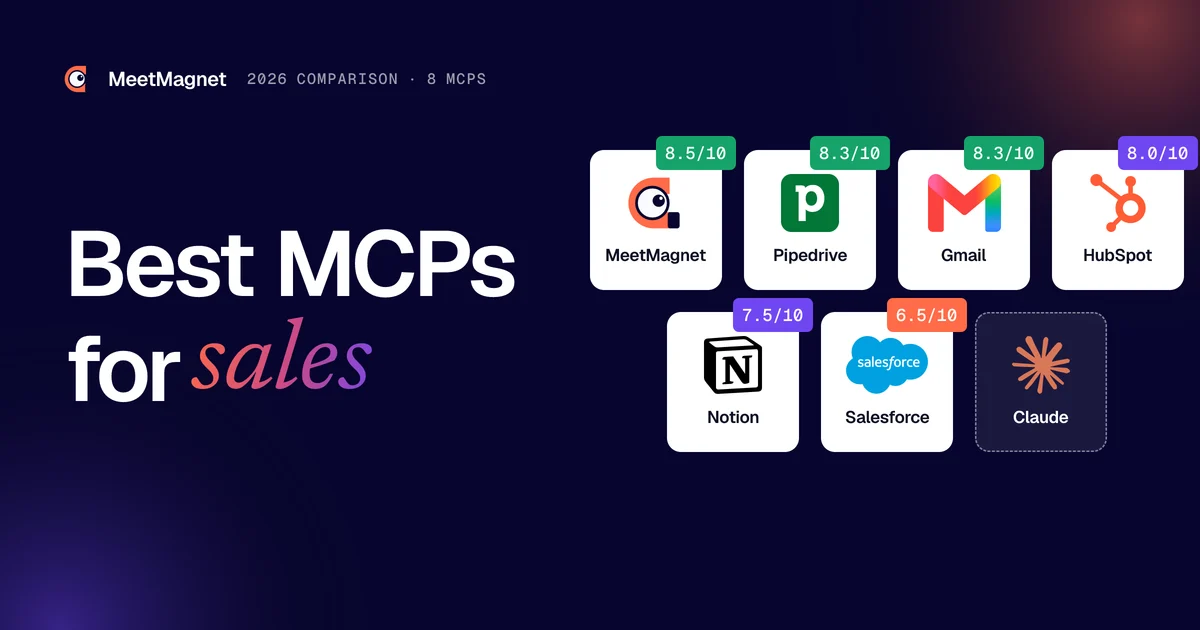
The best MCP servers for sales in 2026 are HubSpot, Pipedrive and Salesforce for the CRM, Gmail for email, Apollo and lemlist for contacts and sequences, Notion for notes, and MeetMagnet for prospects who show a buying signal.
| MCP | What it brings to a salesperson | Server | Access |
|---|---|---|---|
| MeetMagnet | Prospects with their buying signal, messages, replies | Remote, OAuth | Free prospect search to start, then €149 ex. VAT/month |
| HubSpot | CRM contacts, deals, activities | Remote, OAuth 2.1 | All HubSpot accounts |
| Pipedrive | Deals, contacts, leads, activities | Remote, OAuth | All Pipedrive plans |
| Salesforce | Org data, flows and actions | Remote, OAuth | Enterprise Edition and above |
| Gmail | Search, draft, reply, send | Claude connector | All Claude users |
| lemlist | Lead database, campaigns, sequences | Remote, OAuth or key | A lemlist subscription |
| Apollo | Contact search and enrichment, sequences | Remote, OAuth or key | Free to connect, actions use credits |
| Notion | Meeting notes, accounts, team follow-up | Remote, OAuth | Your Notion workspace |
How did we choose and score these MCP servers?
We kept the software that SME owners and salespeople mention to us in meetings, and that has an MCP server published by the vendor itself. Every fact comes from the official documentation, read on 6 November 2026: these servers change every month, so check before you connect.
To be transparent: MeetMagnet is one of the servers compared, and we did the scoring. We scored each server on six identical criteria: what it does for prospecting, whether it is official, how easy it is to connect, how secure the access is, the cost of access, and support for French. Where another tool does better than us, the score says so.
To understand the protocol itself, the official site describes MCP as an open-source standard for connecting AI applications to external systems. Our guide to prospecting with Claude shows the setup step by step.
The 8 MCP servers for sales in detail
1. MeetMagnet: prospects who show a buying signal
The MeetMagnet MCP connector gives the assistant what no CRM contains: decision-makers who have a reason to be contacted now, because they are hiring, posting about a topic linked to your offer or have just started a new role.

From Claude, ChatGPT, Mistral or Perplexity, you create search intents, review the messages prepared for each prospect, handle replies and ask what works best. Nothing goes out without your approval at the start. 🎯
- Server: remote,
https://app.meet-magnet.com/mcp, OAuth login with no key - For prospecting: LinkedIn buying signals, openers, replies, statistics
- Access: free prospect search to start; Self-serve €149 ex. VAT/month, Managed €299 ex. VAT/month
- Limit: it is not an email and phone database, nor a CRM
2. HubSpot: the CRM most open to assistants
HubSpot’s MCP server left beta on 13 April 2026 and is open to all accounts. According to HubSpot’s announcement, it reads contacts, companies, deals, quotes and the full history of calls, meetings, notes, tasks and emails, and can create or update them.

It is the ideal MCP for preparing a meeting (“summarise my last three calls with this client”) or logging a follow-up without opening the CRM. It does not find new prospects: it works on the ones you already have.
- Server: remote,
https://mcp.hubspot.com, OAuth 2.1 with PKCE - For prospecting: client history, follow-up tasks, record updates
- Access: all HubSpot accounts; ready-made connector in Claude and ChatGPT
- Limit: if sensitive data is turned on, activities are blocked
3. Pipedrive: the simplest for an SME
Pipedrive launched its native MCP server on 30 June 2026. According to its official page, it is available on every plan and sits directly in the connector directories of Claude and ChatGPT: no manual setup.

Its best use: paste your call notes and ask it to create the deal, the contact and the follow-up in one sentence. Every action shows up in the change log. ✅
- Server: remote, hosted by Pipedrive, OAuth login
- For prospecting: leads, deals, activities, pipeline analysis
- Access: every plan, within the token limit included in your plan
- Limit: like HubSpot, it does not find new prospects
4. Salesforce: the most complete, the heaviest
Salesforce’s hosted MCP servers have been generally available since 29 April 2026, according to the Salesforce developer blog. They expose the org’s data, flows, Apex actions and queries, with the permissions of the signed-in user.

It is the most secure and the most customisable, but not the fastest to connect: an admin must enable the server in Setup and create a client app. You also need Enterprise Edition or above.
- Server: remote, managed by Salesforce, OAuth with PKCE
- For prospecting: account reviews, opportunities, cases, custom actions
- Access: Enterprise Edition and above, with an admin
- Limit: out of reach for most SMEs
Plug buying signals into your assistant
The connector page gives you the address to paste into Claude or ChatGPT.
5. Gmail: write and reply without leaving the conversation
Claude’s Gmail connector is published by Google in the connector directory. Claude’s help centre says it is open to all users: it searches and reads your emails, drafts messages, and can reply, forward or send, asking for your approval before each send by default.

For a salesperson, it pays off the fastest: find the last exchange with a prospect, draft a follow-up in the thread. Google also offers its own Workspace MCP servers, but they are still limited to a developer preview programme. ✉️
- Server: official connector in Claude, Google login
- For prospecting: email history, drafts, replies
- Access: all Claude users; on Team and Enterprise, an owner turns it on
- Limit: it does not read the content of attachments
6. lemlist: sequences driven from the assistant
lemlist, the cold email tool, has published an official MCP server. It gives access to its lead database, campaigns and sequences: audit a campaign, create a sequence, search for leads and import them, from Claude, Cursor or ChatGPT.

A good choice if you already live in lemlist and send a lot of emails. The server serves the tool: targeting, timing and message are still yours to build.
- Server: remote,
https://app.lemlist.com/mcp, OAuth (or API key) - For prospecting: lead database, campaigns, multichannel sequences
- Access: a lemlist account; on ChatGPT web, Business and Enterprise plans
- Limit: costly actions depend on your lemlist credits
7. Apollo: the contact database in the chat
Apollo is available as a native connector in Claude, ChatGPT and Perplexity. Its server searches people and companies, enriches emails and phone numbers, creates contacts, enrols them in sequences and sends one-off emails. Connecting is free; enrichment uses credits.

On contact volume and range of actions, Apollo does better than us. Its limit: intent stays at company level, and the tool is in English only.
- Server: remote,
https://mcp.apollo.io/mcp, OAuth 2.0 (or master key) - For prospecting: search, enrichment, sequences, emails
- Access: no extra cost to connect, actions use credits depending on your plan
- Limit: an API key acts for the whole workspace, not for a single user
8. Notion: the sales team’s memory
Many SMEs track their accounts and meeting notes in Notion. Its hosted MCP server reads and writes your pages and databases; Notion’s help centre explains how to connect it to Claude, ChatGPT or Cursor.

Useful for finding what was said about an account or preparing a meeting summary, less so for prospecting. 📝
- Server: remote,
https://mcp.notion.com/mcp, OAuth - For prospecting: notes, accounts, follow-up plans
- Access: your Notion workspace; on Enterprise, the admin picks the allowed tools
- Limit: no prospect data to begin with
What about LinkedIn, is there an official MCP server?
No. LinkedIn publishes no MCP server and no connector for Claude or ChatGPT. The “LinkedIn MCP” servers on GitHub are built by third parties, and many browse with your session: your account becomes the tool, with the risk of a restricted LinkedIn account. ⚠️
We cover the options and their risks in our article on the LinkedIn MCP. At MeetMagnet, signal searches do not go through your account.
Key takeaway: on LinkedIn, prefer a tool that brings you the signals over a server that drives your profile.
How does each MCP server score, criterion by criterion?
Here are the six criteria, scored out of 10, based on the official documentation as of 6 November 2026:
- Prospecting: does the MCP help you find, contact and follow up prospects?
- Official: is the server published and maintained by the vendor?
- Connection: how many steps to connect it, and do you need an admin?
- Security: OAuth, user permissions, approval before sensitive actions
- Cost of access: what you have to pay to use it
- French: do the tool and its documentation exist in French?
| MCP | Prospecting | Official | Connection | Security | Cost of access | French |
|---|---|---|---|---|---|---|
| MeetMagnet | 9 | 10 | 7 | 8 | 7 | 10 |
| HubSpot | 6 | 10 | 7 | 9 | 9 | 7 |
| Pipedrive | 6 | 10 | 9 | 9 | 8 | 8 |
| Salesforce | 6 | 10 | 4 | 10 | 3 | 6 |
| Gmail | 5 | 9 | 10 | 8 | 10 | 8 |
| lemlist | 8 | 10 | 8 | 8 | 6 | 8 |
| Apollo | 9 | 10 | 9 | 7 | 7 | 4 |
| Notion | 3 | 10 | 9 | 8 | 7 | 8 |

Key takeaway: no MCP server scores 10 everywhere. Gmail is the easiest to connect, Salesforce the most secure, Apollo the richest in contacts; MeetMagnet is the only one that brings the timing and the reason to write.
How do you choose and combine MCP servers for prospecting?
You do not choose one MCP server, you build a stack. The assistant gets interesting when it cross-checks several sources: a prospect’s signal, the CRM history and the email thread. Here is the stack we recommend to an SME. 💡

- A source of prospects. MeetMagnet if you want decision-makers who show a signal; Apollo or lemlist if you need emails and phone numbers in volume.
- Your mailbox. Gmail, to find an exchange and reply in the thread.
- Your CRM. HubSpot or Pipedrive for an SME, Salesforce if you already have it.
- Optionally, your notes. Notion, or Slack if your team discusses accounts there.
Example
You: “Among the prospects detected this week, which ones are already in HubSpot? For the others, prepare a first message.”
What happens: the assistant reads the signals in MeetMagnet, checks the CRM, then suggests an opener for each new prospect. Signal: a plant manager is hiring a maintenance manager. Opener: “Hi Paul, when a plant hires in maintenance, it’s often because downtime is getting expensive. Is that the case for you, or is it mostly a departure to replace?” You approve, and the positive reply goes into HubSpot.
Which assistant? Claude accepts custom connectors on every plan, with the free plan limited to one, according to Anthropic’s help centre. On the ChatGPT side, OpenAI’s help centre limits custom MCP servers to Business and Enterprise plans; official connectors such as HubSpot, Pipedrive or Apollo are simpler. Mistral’s Le Chat also accepts MCP connectors. 🔌
To go further on the CRM side, read our article on a small business CRM connected to Claude, and for the tools themselves, our comparison of B2B prospecting software.
Key takeaway: three well-chosen MCP servers beat ten. One source, one mailbox, one CRM.
Which mistakes should you avoid with prospecting MCP servers?
The most common one: connecting a server found in a directory without checking who wrote it. The official MCP Registry lists thousands of servers published by companies and individuals. An unofficial server can keep your credentials or act with too many permissions. ❌
- ✅ Prefer remote, official servers, with an OAuth login rather than an API key pasted into a file.
- ✅ Keep manual approval of sends at the start: Claude, ChatGPT and most vendors offer it by default.
- ⚠️ Be careful with workspace API keys: at Apollo, a master key acts for the whole workspace, not for a single salesperson.
- ❌ Do not stack five tools that do the same thing: the assistant chooses less well between similar actions.
Key takeaway: an MCP server acts with your permissions. Give it the minimum, and watch what it does in the first weeks.
Which MCP server should you choose for your profile?
- 🎯 You want meetings with decision-makers who have a reason to buy: MeetMagnet, plus your CRM
- 🧲 You need emails and phone numbers in volume: Apollo
- 🚀 You already send email sequences: lemlist
- 🗂️ You are an SME that wants a simple CRM driven by AI: Pipedrive or HubSpot
- 🏢 You already have Salesforce and an admin: Salesforce
- ✉️ You want to save time right away: Gmail, connected in two clicks
MCP servers do not replace method: they shorten the path between a question and an action. Start with the source of prospects you are missing, add your mailbox and your CRM, and measure the meetings you get rather than the actions you launch. 👉 If what you are missing is the right time and the right reason to write, try the MeetMagnet MCP connector.
Sources
- “Remote HubSpot MCP server is now generally available”, HubSpot Developers, 13 April 2026, accessed 6 November 2026, https://developers.hubspot.com/changelog/remote-hubspot-mcp-server-is-now-generally-available
- “Pipedrive MCP Server”, Pipedrive, accessed 6 November 2026, https://www.pipedrive.com/en/features/mcp-server ; press release of 30 June 2026, https://www.pipedrive.com/en/newsroom/pipedrive-launches-native-mcp-server-bringing-crm-workflows-directly-into-ai-assistants
- “Salesforce Hosted MCP Servers Are Now Generally Available”, Salesforce Developers, 29 April 2026, accessed 6 November 2026, https://developer.salesforce.com/blogs/2026/04/salesforce-hosted-mcp-servers-are-now-generally-available
- “Use Google Workspace connectors”, Claude Help Center, accessed 6 November 2026, https://support.claude.com/en/articles/10166901-use-google-workspace-connectors
- “Configure the Google Workspace MCP servers”, Google for Developers, accessed 6 November 2026, https://developers.google.com/workspace/guides/configure-mcp-servers
- “Notion MCP”, Notion Help Center, accessed 6 November 2026, https://www.notion.com/help/notion-mcp
- “Slack MCP server overview”, Slack Developer Docs, accessed 6 November 2026, https://docs.slack.dev/ai/slack-mcp-server
- “Get started with custom connectors using remote MCP”, Claude Help Center, accessed 6 November 2026, https://support.claude.com/en/articles/11175166-getting-started-with-custom-connectors-using-remote-mcp
- “Connecting custom MCP servers in ChatGPT”, OpenAI Help Center, accessed 6 November 2026, https://help.openai.com/en/articles/12584461-connecting-custom-mcp-servers-in-chatgpt
- “Le Chat. Custom MCP connectors. Memories.”, Mistral AI, accessed 6 November 2026, https://mistral.ai/news/le-chat-mcp-connectors-memories/
- “What is the Model Context Protocol (MCP)?” and “Official MCP Registry”, Model Context Protocol, accessed 6 November 2026, https://modelcontextprotocol.io/docs/getting-started/intro and https://registry.modelcontextprotocol.io/
- lemlist documentation (help centre, “Set up the lemlist MCP server”) and Apollo documentation (“Apollo MCP”, docs.apollo.io), accessed 6 November 2026.
Frequently asked questions
What is an MCP server for a salesperson?
An MCP (Model Context Protocol) server is a standard plug that connects an AI assistant such as Claude, ChatGPT or Mistral to a piece of software. For a salesperson, it means asking your assistant in plain English to find prospects, summarise a client's history in the CRM or draft a reply in Gmail, without switching tabs.
Does HubSpot have an official MCP server?
Yes. On 13 April 2026, HubSpot opened a remote MCP server, hosted by HubSpot, to all its accounts. It reads contacts, companies, deals and activities, and can create or update them. The connection uses OAuth, and the assistant only sees what your HubSpot user is allowed to see.
Is there an official LinkedIn MCP server?
No. LinkedIn publishes no MCP server and no official connector for Claude or ChatGPT. The “LinkedIn MCP” servers you find online are built by third parties, and many browse with your session, which puts your account at risk of restriction. For LinkedIn signals, use a tool that does not rely on your login.
Can I use these MCP servers in ChatGPT and Mistral?
Yes, for most of them. HubSpot, Pipedrive and Apollo are official connectors in ChatGPT. To add a custom MCP server, OpenAI's help centre limits it to Business and Enterprise plans. Mistral's Le Chat also accepts custom MCP connectors. The server addresses stay the same.
How many MCP servers do I need for prospecting?
Three are enough to start: a source of prospects (buying signals or a contact database), your mailbox and your CRM. Beyond that, the assistant hesitates between similar tools and you approve more actions. Add a fourth MCP only when a specific need comes up every week.
Etienne Douillard
Co-founder and CEO, MeetMagnet
An engineer and entrepreneur for over five years, Etienne works every week with B2B SMEs on signal-based prospecting.
From intent to booking
MeetMagnet spots who has a reason to talk to you right now, writes the opener that stands out, and a real person keeps it on track.